Areas Served, Service Areas, Location Settings, Radius -- Now in Google Maps and LBC
Mar 24
A few minutes ago our SEO Program Director stumbled upon a neat, new feature in Google’s Local Business Center: Service Areas and Location Settings.
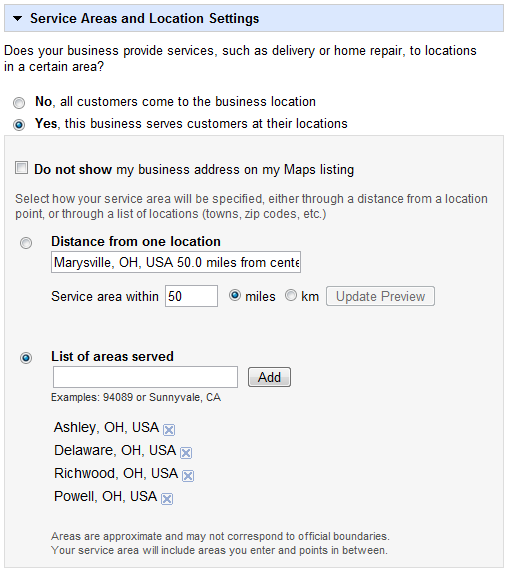
Complementing this new feature is a map that displays your modifications and updates as you make them on the left:

At EZlocal, we are extremely excited about this new change, as it solves one of the tragic flaws of local business search: What if your business is not located in the areas you serve? For example, what if you own a woodworking business located in Cicero, IL that does very high-end work. You wouldn’t want to be found in Cicero, a working-class community, there isn’t much demand there. Instead, you would want to target affluent suburbs like Lincolnshire, Naperville and Barrington.
Before this new feature arrived, business owners only had 3 options:
- Move their business to the areas they wish to serve (usually cost prohibitive).
- Set up fake addresses AND phone numbers for each city you want to be found in (a black hat technique that is hard to juggle, puts you at a high risk of losing search placement if Google catches on and dilutes the strength of your profile over multiple accounts).
- Do nothing.
As you can see, none of these options were particularly appealing, but all your worries are now a thing of the past. Let’s explore the new feature.
The first thing we see is a question: "Does your business provide services, such as delivery or home repair, to locations in a certain area?" Google provides two options to this question: "No, all customers come to the business location” and "Yes, this business serves customers at their locations."

This is pretty straightforward. If you are a service business that makes service calls, you better be selecting "Yes."
The next thing we see is a check box that says, "Do not show my business address on my Maps listing."

Google was really thinking when they added this check box because it accounts for several delicate questions:
- What if you don’t want your wealthy customer base knowing you are based in a less affluent area?
- What if you work out of a van and use your home address for your listing? How do you assure that no one will show up at your home, trying to contract your services in person?
One click in this checkbox completely absolves any worries these questions may inspire.
The final section of this new feature is the coolest, as it allows you to manipulate your areas of service and get immediate feedback from the map displayed on the right. Google starts by giving you two options:
- The first option is “distance from one location.” This option allows you to select a single location and then specify a radius from that center. Our SEO Program Director toyed around with this function and found that the radius is capped at 500 miles.

- The second option is “List of areas served.” This option allows the business owner to input the specific cities they serve and the map will reflect this on the right, as seen below.
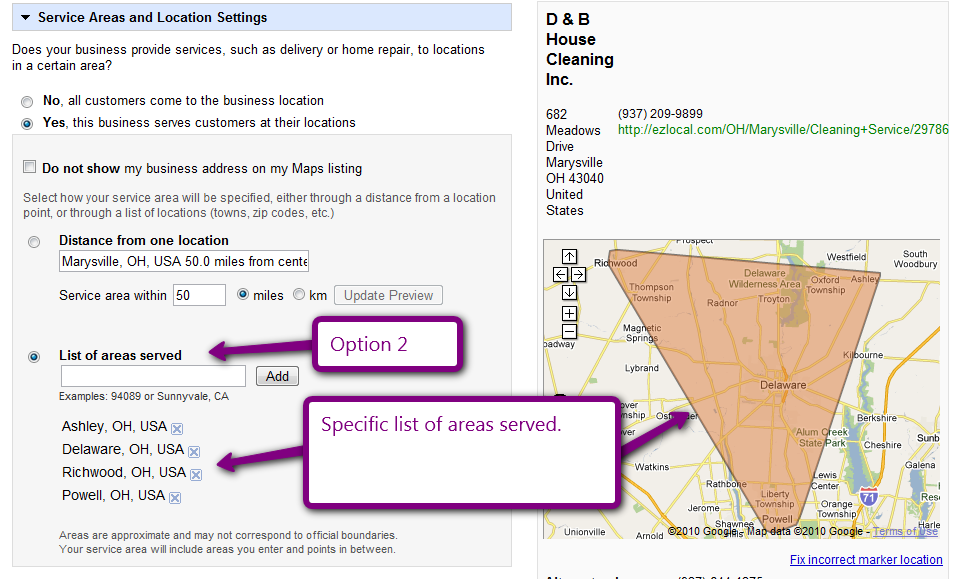
Finally, Google notes that, “Areas are approximate and may not correspond to official boundaries. Your service area will include areas you enter and points in between.” This is also straight forward. You can cherry pick the cities you want to serve, but your final service area will include all the points in between, as well, hardly cause for complaint. Overall, this is a fantastic new feature and one that you should definitely check out if you are a service business. Sprint on over to the Local Business Center and update your listing now! Or better yet, let EZlocal do it for you!